An AI Agent without tools is like a brilliant consultant locked in a room with no phone, no laptop, and no door. It can think. It can reason. It can write a beautiful plan. But it cannot do anything.
For years, the industry obsessed over the "thinking" part — bigger models, smarter prompts, longer context windows. Meanwhile, the part that actually makes AI useful — its ability to reach into your systems, read your files, query your database, and apply changes — was held together with duct tape and bespoke integrations.
Then came MCP — the Model Context Protocol. And the room finally got a door.
Tools: The Forgotten Half of AI
When someone says "the AI can read my files," what they actually mean is something very specific and very mechanical. Behind the scenes, a developer has registered a function — let's call it read_file — with the AI Agent. That registration looks roughly like this:
{
  "name": "read_file",
  "description": "Read the contents of a file at the given path",
  "parameters": {
    "path": { "type": "string", "description": "Absolute file path" }
  }
}
That's it. That's the magic. A name, a description, and a list of parameters. The LLM reads that definition, decides when to call it, and the Agent executes the actual code on your behalf.
Multiply that by every action you want AI to perform — read a file, run a test, query Postgres, create a Jira ticket, send a Slack message, post to Odoo — and you start to see the scale of the problem. Tools are not a feature of AI. They are AI's entire ability to act on the world.
The Pre-MCP World: A Mess of Bespoke Wires
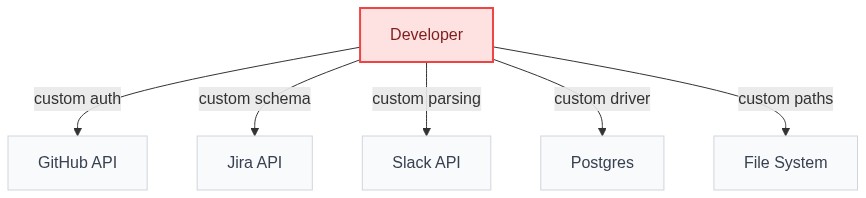
Before MCP, every AI vendor invented their own way of registering tools. Cursor had one format. Continue had another. Cline had a third. Each IDE, each agent, each framework spoke a different dialect.
The consequence? If you wanted to plug GitHub into five different AI agents, you wrote five separate integrations. Want to add Jira? Five more. Want to swap your IDE next year? Throw it all away and start over.
The AI ecosystem looked like the back of a 1990s entertainment center: a tangled nest of incompatible cables, proprietary connectors, and adapters that only fit one device.
Click to enlarge
Enter MCP: The Universal Standard
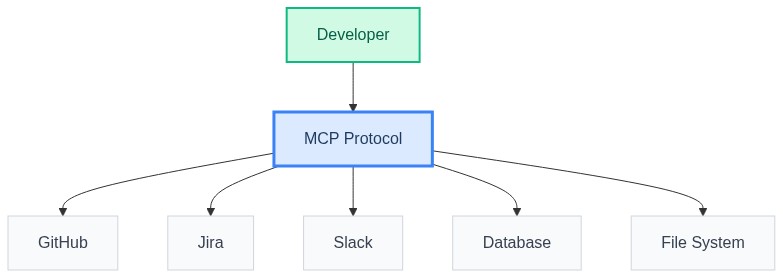
The Model Context Protocol is, at its core, a simple agreement. It says: "If you build a tool server that follows this spec, any compliant AI Agent can use it. No custom glue. No vendor lock-in. No bespoke integrations."
- MCP Server: a small program that exposes a set of tools (e.g.,
github-mcp,postgres-mcp,odoo-surface-mcp). - MCP Client: the AI Agent (Claude Desktop, Cursor, Augment) that knows how to discover and call those tools.
- The Protocol: a tiny, standardized JSON-RPC handshake that lets any client talk to any server.
Build one MCP server, and every MCP-compatible Agent on Earth can use it instantly. That's the USB-C moment. Your phone, your laptop, your headphones, your monitor — all the same connector. One spec to rule them all.
Click to enlarge
Local vs. Remote MCP: Two Sides of the Same Standard
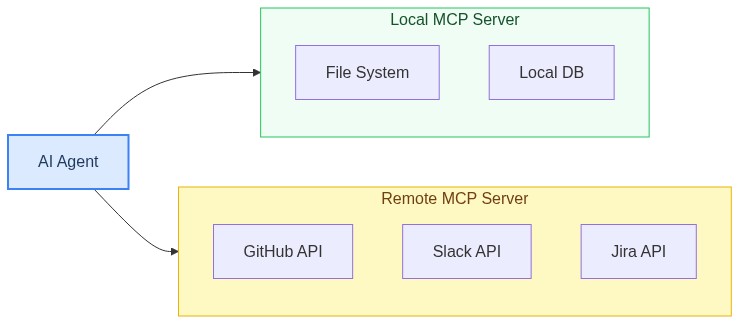
One protocol, two execution models. Choosing between them is less about technology and more about where your data lives, who else needs access, and how much you trust the network.
Local MCP (stdio)
Where it runs: Directly on your machine, spawned as a subprocess by the Agent.
Best for: File systems, local databases, git repositories — any tool needing access to your machine.
filesystem-mcp— Agent reads/writes files.sqlite-mcp— Agent queries a local DB.git-mcp— Agent inspects diffs, commits.
Trade-offs: Fastest, most private. But not shareable across a team.
Remote MCP (HTTP / SSE)
Where it runs: On a server, accessed by one or many Agents over the network.
Best for: Shared business systems, hosted SaaS, anything requiring central auth or audit trails.
- A company-wide
jira-mcpserving every developer. - Vendor-hosted MCP (Linear, Sentry, Notion).
odoo-surface-mcpexposing your live ERP.
Trade-offs: Centralized, auditable, team-wide. Requires hosting and auth.
Click to enlarge
Case Study: Odoo Surface MCP — The 2-Sided USB-C
All of this is theory until you watch it work on a real system. Odoo Surface MCP is the case study.
On one side: your AI Agent — Claude, Cursor, Augment, whatever you prefer. On the other: the entirety of your Odoo instance — the ORM, the website builder, chatter, attachments, scheduled actions, translations, the works.
With MCP, you plug the cable in once. The Agent immediately discovers it can create, update, search_records, get_fields, post messages, schedule activities, manage website pages, fetch attachments, and run server actions — all through one standardized interface, with proper authentication and audit logging.
That's the 2-sided USB-C in action. Plug. Discover. Execute.
Closing the Loop
MCP is what gives the Agent its hands. Without it, the Agent has intent but no reach. With it, the Agent can touch any system that speaks the protocol.
In the next post, we'll go deep on the first pillar itself: The AI Agent — The Doer That Makes AI Actually Work.
The MCP Takeaway
One protocol. Any agent. Any tool. Any system.
One Standard
Build a tool server once, every compliant Agent can use it.
Local or Remote
Same protocol on your laptop or in the cloud.
Real Reach
Odoo Surface MCP proves it: plug in, discover, execute against production systems.