One VS Code experience for every AI agent
ACP Patchbay is a unified client for any ACP-compatible coding agent — consistent chat, capabilities you can trust, and deep editor context. Stop learning a new extension every time you switch agents.
The agent you pick shouldn't decide the tools you get
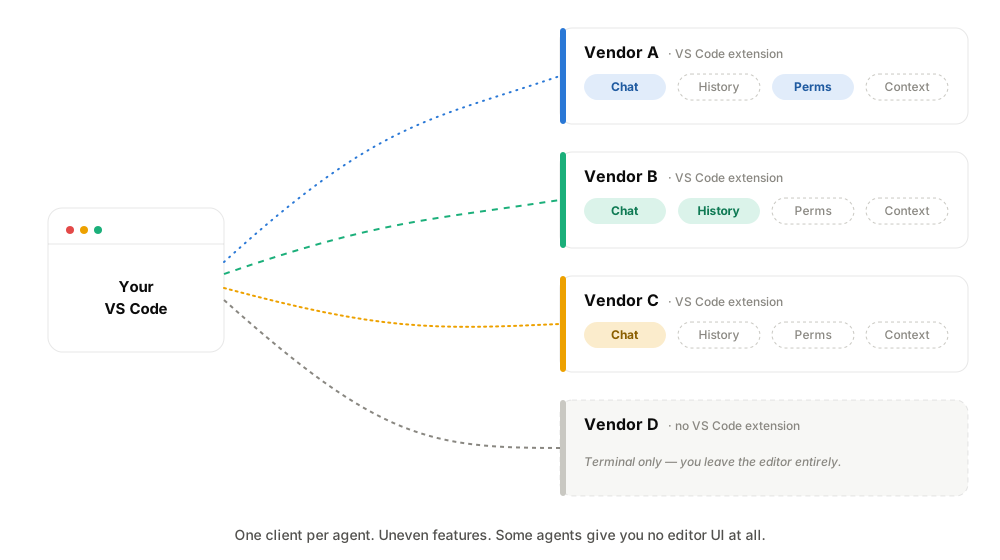
The AI coding space fragmented fast. Every vendor ships its own VS Code extension, and they're uneven.
One has a great chat but no session history. Another has history but a clumsy permission flow. A third has no extension at all and lives only in a terminal. Switch agents and you switch muscle memory, lose features, and relearn the quirks.
That's backwards. The agent should be the variable. The experience should be the constant.
ACP makes the agent a plug-in, not a lock-in
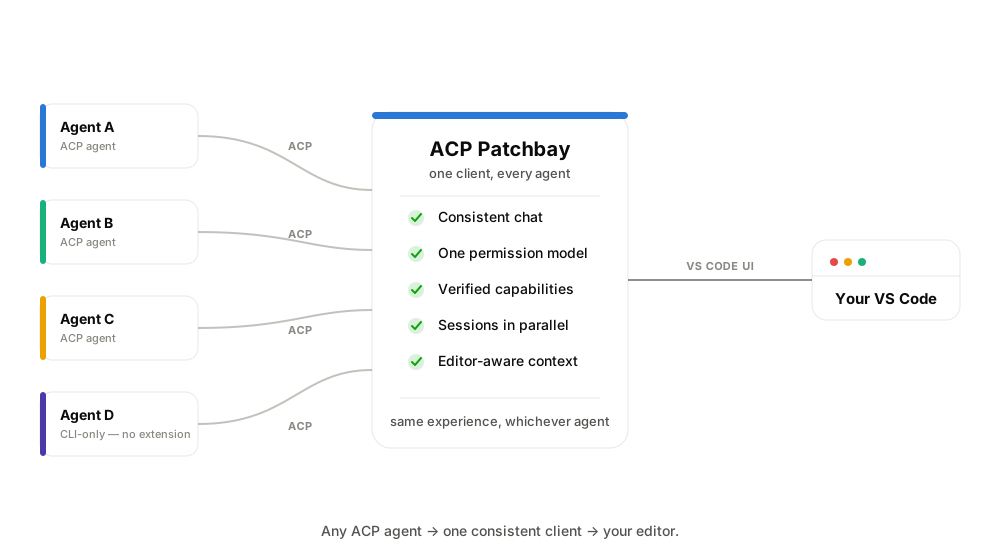
The Agent Client Protocol standardizes how an editor and an agent talk — sessions, prompts, tool calls, permissions. Patchbay speaks it fluently, so any ACP-compatible agent drops into the same client. One chat surface. One permission model. One place for sessions and history. The agent becomes something you swap, not something you're married to.
And because the bar is "speaks ACP," not "shipped an extension," agents that only ever existed as a CLI are first-class citizens here.
Patchbay bets on the protocol, not on any single vendor's roadmap. As agents converge on ACP, the client that speaks it for all of them is the one that lasts — a vendor's own extension can improve or be retired, and either way your workflow stays put.
Built on top of a faithful ACP client
A plain client proves the connection works. Patchbay adds the orchestrator layer.
Capabilities you can trust
An agent's handshake tells you what it claims, not what works on the wire. Patchbay tracks every capability as declared vs. used and only lights up a feature once the path has genuinely fired — so "native fork" means verified, not promised.
One permission model
A single, consistent permission broker across every agent. You review and approve what an agent does — file writes, terminal, tools — the same way regardless of which agent is driving.
Editor-aware context
A built-in local MCP server hands agents real editor state — current file, selection, open editors, diagnostics, workspace layout — and can ask you for input mid-turn. The agent sees what you see.
Sessions in parallel
Run many sessions at once — on one agent or across several at the same time, each with its own history. A live dot marks a turn in flight, an unseen dot marks a session that finished while you were elsewhere, and a chime tells you the moment a turn lands.
Rendering that does the output justice
Agents don't just emit text. Patchbay renders it the way it's meant to be read.
GitHub-flavored markdown, syntax-highlighted code, LaTeX math via KaTeX, Mermaid diagrams opened as a real editor panel, and correct typesetting for right-to-left and CJK output. Tool calls, file edits, and permission requests render inline as structured blocks — with a live plan and touched-files read-out as the agent works. Not walls of text.
A single turn: plan → math → Mermaid → a real file edit → a run → a five-language summary.
Connect any agent in minutes
Add an agent, sign in through its own terminal login, and you're chatting. The same add-and-connect path for every ACP agent — no bespoke setup per vendor. Agents, capabilities, integrations and preferences all live in one settings surface.
Everything you'd expect from a great client
- Polished chat composer with inline
/commands and@-mentions of workspace files - Full session history — list, resume, and fork, backed by the agent's own store
- Faithful replay of past sessions, with no dropped messages
- Live plan + touched-files read-out while the agent works
- MCP integrations, including remote servers over Streamable HTTP, added and verified in-client
- Theme-native UI that follows your VS Code theme
Bring your own agent. Keep your experience.
Install ACP Patchbay and connect any ACP-compatible agent in minutes.
Install from the Marketplace → View on GitHubBuilt by Solutions Unity. Works with any agent that implements the Agent Client Protocol.